How to Build an AI Automation Agency Website That Wins Clients
What an AI automation agency website needs to win clients: clear outcomes, workflow diagrams, real case studies, honest pricing and straight answers on data.
On this page
- The problem with most AI agency websites
- Start with one kind of client
- Writing AI agency website copy clients understand
- Draw every workflow you sell
- Show where a person stays in the loop
- Getting case studies before you have clients
- Be open about how pricing works
- Answer the data question up front
- The pages an AI automation agency website needs
- A call to action worth clicking
- Pick a platform you’ll keep updating
- A five-second test before you launch
- Frequently asked questions
Most AI automation agency websites are written for other AI people. They talk about agents, LLMs and orchestration, share the same dark gradient and glowing orb, and promise to transform your business. Then they wonder why the dental clinic, the logistics company and the accounting firm they actually want as clients never book a call.
The people who hire an automation agency want their hours back, faster replies to their customers and fewer mistakes. This guide walks through what an AI automation agency website needs to make those people get in touch: what to say, what to show, which pages to build, and how to answer the questions every prospect is quietly asking.
The problem with most AI agency websites
They look alike because they start in the same place: a founder who is excited about the technology, a template made for software startups, and copy written to impress other founders. The result could belong to any one of a thousand agencies.
That sameness is your opening. A business owner comparing three agencies will remember the one that described their problem in their own words.
Start with one kind of client
Before you write a word, name the client. “Small and medium businesses” is not a client. “Property managers with 50 to 500 units” is. So is “online stores that answer the same support questions all day” or “law firms buried in intake forms”.
A narrow focus feels risky when you’re starting out, but it makes every other decision on the site easier. You know which problems to lead with, which tools to mention and which examples to show. You can still take other work; the website just shouldn’t try to speak to everyone at once.
If you do serve several industries, give each one its own page instead of listing them all on the home page. It reads better, and it’s how you start appearing in searches like “automation for real estate agencies”.
Writing AI agency website copy clients understand
The first screen has one job: tell visitors what changes in their business if they hire you. Say what gets faster or disappears, say who it’s for, and offer one clear next step. The technology can wait until further down the page.
The easiest way to get there is to take every vague line and ask what it looks like on an ordinary Monday morning:
| Instead of | Try something like |
|---|---|
| We build AI agents for your business | Every new lead gets a reply in under two minutes, day or night |
| Transform your operations with AI | Your team stops copying data between the CRM and spreadsheets |
| Cutting-edge automation solutions | Invoices are checked, approved and filed before anyone opens their inbox |
| Leverage the power of LLMs | Routine support tickets answer themselves; your team handles the hard ones |
Each line on the right is something a client can picture happening in their own office. That’s the test for every sentence on the site: if the visitor can’t picture it, rewrite it.
Draw every workflow you sell
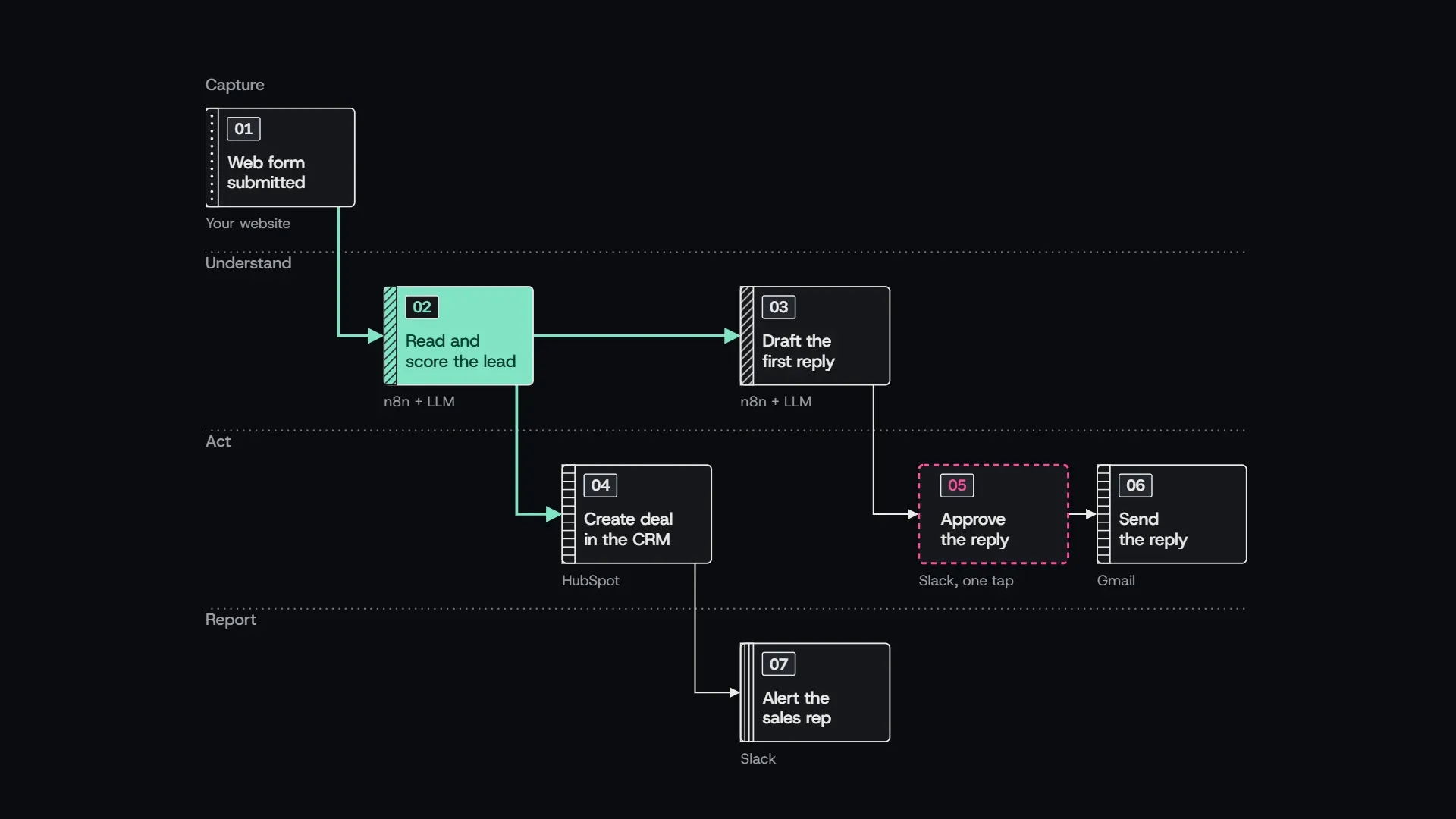
A diagram does more than three paragraphs about intelligent pipelines. It shows you’ve thought the process through, and it lets clients see where their own way of working fits in. Here is a typical lead intake workflow, drawn the way a client should see it:
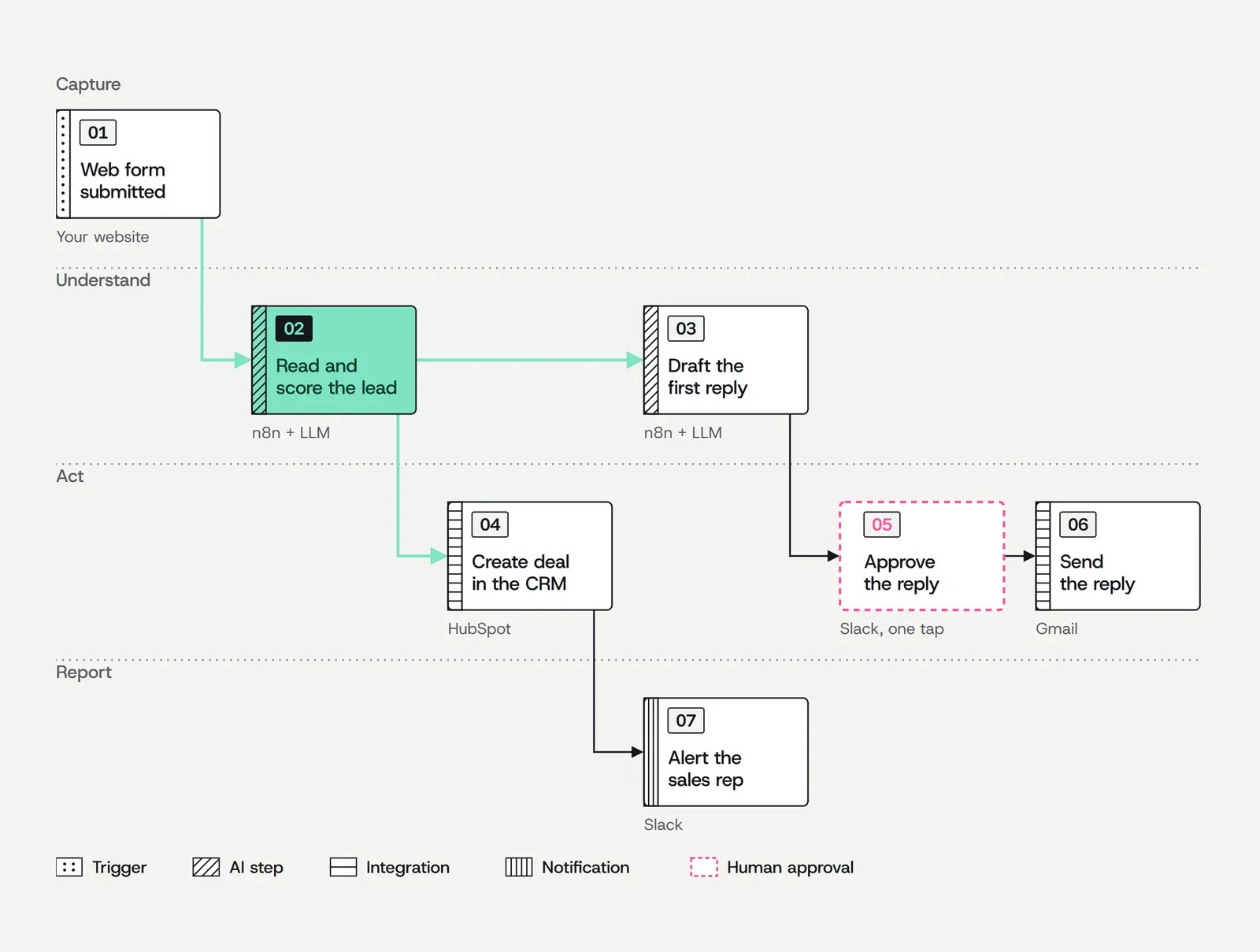
Seven steps, four stages, and every step says which tool it runs on. The step in green is the agent at work; the one outlined in pink waits for a person before anything reaches the customer.
Keep your own diagrams this plain: what starts the workflow, what happens, what the result is. Name the tools the client already uses, like Gmail, HubSpot, Shopify or Slack, because recognising their own setup is reassuring. One diagram per use case also gives your services page a natural structure: the workflow, the problem it removes and the result it produced.
Show where a person stays in the loop
Anyone who has read about an AI agent emailing the wrong thing to a customer will want to know what stops that from happening to them. A good workflow doesn’t run unattended from end to end, and the website should say where it stops.
Mark the steps that wait for a person, like the approval in the diagram above. Anything that reaches a customer, moves money or changes a contract usually belongs there, at least at first. Many agencies also hand a task to a person whenever the model is unsure, for example when an email doesn’t fit any of the categories the workflow was built to sort.
Then explain what happens when something breaks, because sooner or later it will. An app changes its API, a login expires, a supplier starts sending invoices in a new format. Say how you find out (monitoring and alerts, ideally before the client notices), how quickly you respond, and what the workflow does in the meantime: retry, pause or pass the task back to the team. Most of that is what a monthly retainer pays for, which makes your pricing easier to explain too.
Getting case studies before you have clients
Every new agency hits this wall. The way through is to treat your first projects as your first source of proof.
Start with your own business. If you automated your lead intake or your invoicing, that’s a real case study with real numbers. Next, offer one or two early clients a reduced price in exchange for permission to publish the results, and agree on it before the project starts. Until those exist, you can build a demo workflow for a typical business in your niche, as long as you label it clearly as a demo.
Whatever the source, a useful case study answers four questions in order: what the situation was, what you built, what changed and what the client says about it. “What changed” needs a number measured before and after, whether that’s hours per week, response time or error rate.
Never invent clients or results. One modest, real case study is worth more than a row of logos nobody can verify.
Be open about how pricing works
You don’t need a full price list, but you should explain how your pricing works. A common model is a one-off fee to build the workflows plus a monthly retainer to host, monitor and adjust them. Others charge a fixed price per workflow, sell a monthly plan with a set number of changes, or start every client with a paid audit that’s credited against the build.
Whichever you use, saying so up front, even as “projects usually start from…”, filters out prospects who were never going to buy and reassures the ones who are. If you’d rather not publish numbers, at least explain what drives the cost: how many workflows, which tools are involved and how much custom logic they need. Visitors who understand the model arrive at the call ready to talk about their project.
Answer the data question up front
Every business owner who considers automation asks the same question: who will have access to our data? The website should answer it before they have to ask.
Automation means connecting to a client’s email, CRM and customer records, sometimes even their bank. For many prospects that’s a bigger objection than price, and most agency sites barely mention it.
Give it a section of its own, or a page, and cover what a careful client would ask in the first call. Which tools process their data, and where do those tools store it? Is any of it used to train AI models? How long do you keep logs and copies, and who on your team can see them? Explain how access works, too: whether you connect through accounts the client owns and can revoke at any time, and whether each client’s credentials are kept separate. Then say what happens when the contract ends: what you delete, what you hand over and how quickly.
If you work with clients in the EU, you’ll usually be processing personal data on their behalf. Mention GDPR, offer a data processing agreement and publish your list of subprocessors, the third-party services that touch their data. Write all of it in plain language, then keep your privacy policy accurate, because in this niche people actually read it.
The pages an AI automation agency website needs
You can launch with five pages:
- A home page with the outcome, two or three workflows, one case study and a call to action.
- A use cases page, with one section per problem you solve and a diagram for each.
- Case studies, even if there’s only one for now.
- An about page with a real name and a real photo. In a market full of faceless agencies, that alone sets you apart.
- A page to book a call, with a calendar and a few lines on what happens during the call.
A privacy policy and terms belong there from day one. After that, two kinds of page are worth adding as soon as they have something to say.
The first is a page per service, once you sell more than two or three distinct automations. Each one can carry its own workflow diagram, its own case study and its own call to action, and each can rank for a search like “AI lead qualification” in a way one long services page can’t. The second is a page per industry, once a sector brings you repeat enquiries or a case study, because a property manager wants to see work for property managers. A pricing or “how we work” page, a FAQ and a blog can follow as the agency grows.
A call to action worth clicking
“Contact us” asks for effort and promises nothing in return. Offer something specific instead: a free 30-minute automation audit, a call where you map one of their processes together, or a short form where they describe the task they’d most like to get rid of.
Tell them what they’ll leave with, for example “a list of the three processes worth automating first”, and keep the form short. Name, email, company and one open question is plenty. Every extra field costs you leads.
Pick a platform you’ll keep updating
The platform matters less than what you put on it, but it decides how easily you’ll keep the site up to date, and an automation agency’s site needs new case studies regularly.
If you want to edit visually and launch this week, Framer and Webflow are the quickest route, at the cost of a monthly fee and a site that’s harder to move later. WordPress has the largest ecosystem but asks for ongoing plugin and security maintenance. If you’re comfortable with code, and many automation builders are, Astro gives you very fast pages, cheap or free hosting and a site you own file by file.
Whichever you choose, a good template saves the weeks you’d otherwise spend on layout and responsive design. That time is better spent on the copy, the diagrams and the case studies, which no template can write for you. Look for one built around case studies and services pages rather than a generic startup landing page, and check the code and license before you pay; our guide on how to choose an Astro template covers what to look for, whichever platform you end up on.
A five-second test before you launch
Show your home page to someone in your target industry for five seconds, then close it. Ask them two things: what do you do, and who is it for? If they can’t answer both, the hero needs another pass.
Then ask what would stop them from booking a call. Whatever they say is the next section to write.
Frequently asked questions
Do I need a website to start an AI automation agency?
Not to land your first clients, which usually come from referrals and outreach. But prospects look you up before they reply, and a simple site with one real case study makes that outreach far more convincing.
How many pages does an AI agency website need?
Five are enough to launch: home, use cases, case studies, about and a page to book a call, plus a privacy policy. Add a page per service and per industry, a pricing page and a blog as the agency grows.
How much does an AI agency website cost?
A template costs tens of dollars plus a few days of your own time, most of it spent writing. A custom site from a freelancer or studio usually runs into the thousands, depending on the number of pages and how much design work it needs.
Should an AI automation agency use a website template?
If your budget and time are limited, yes. A template built for agencies handles layout, responsive design and the technical basics, so your time goes into the copy and case studies, which are what actually win clients.